Banner
Showing posts with label 3D effects. Show all posts

Monday, June 25, 2012

2 Free Method to Manage 2D to 3D Conversion

The great success of Avatar has led the world to the era of 3D movie. 3D movies, especially animated 3D movies can always gain great success in the movie market. In the past few months, four 3D movies including The Avenger, Men in Black III, Madagascar 3: European's Most Wanted and Brave have dominated the ranking list successively.

With the rapid development of 3D movies comes the advancement of 3D devices. Nowadays we not only have 3D TVs and 3D lap-tops but also glasses-free 3D mobiles. However, with the popularization of 3D technology, it is still not an easy task for us to watch 3D movies. For one thing, we can neither afford 3D TVs nor buy 3D movie ticket each time. For another, there are two limited 3D movies for us on the Internet.

Therefore, a feasible to solve this is to convert those 2D files to 3D movies with some 2D to 3D converters. Though the 3D effects of the movies may not be that perfect, it is the cheapest and easiest way for us to access to 3D movies. The post will present you two free methods to manage 2D to 3D conversion.

I. Free 2D to 3D converter

In order to attach 3D effects to 2D videos, you can refer to Moyea Video4Web Converter, a free 2D to 3D converter. To manage 2D to 3D conversion, follow those steps.

1. Download and launch Moyea Video4Web Converter. Open it, click "File" and select "Add Video Files" in the drop-down menu to input the video.
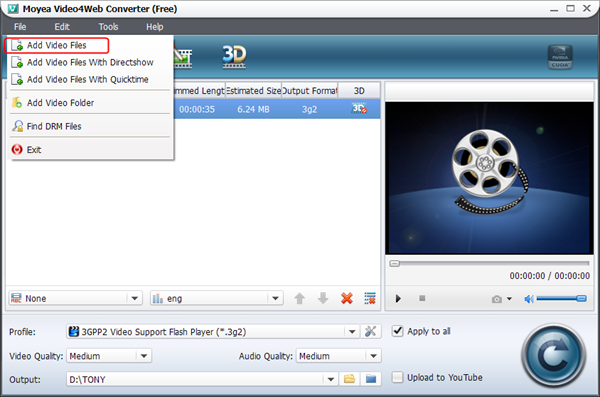
Import 2D video

2. Set the output file as FLV/MP4/MOV/3GP/3G2 video in the drop-down menu of "Profile".
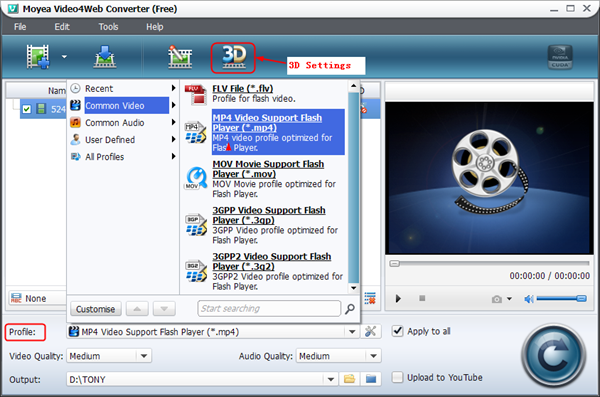
Set the output file

3. Click "3D Settings" icon and then six 3D effects are provided. Choose the one you want and adjust 3D depth with corresponding bar in the interface.
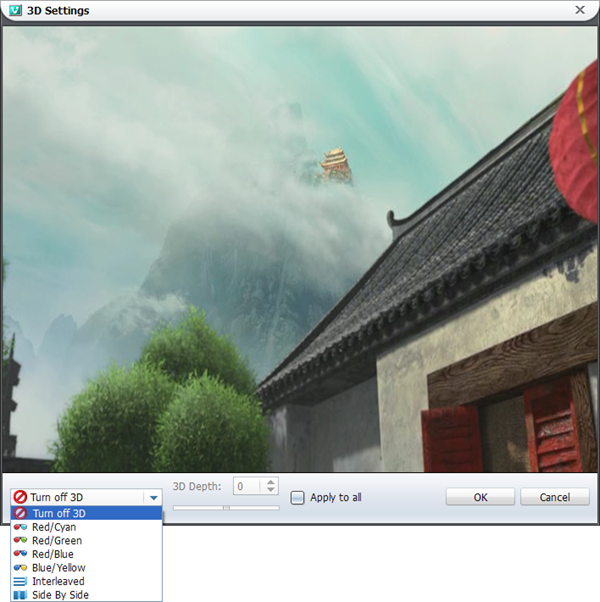
3D Settings

4. Click convert button to start the conversion. When the conversion completes, you can have mange the process of 2D to 3D conversion.

As a free 2D to 3D converter, Moyea Video4Web Converter can only support the output of limited files. If you want more powerful 2D to 3D Converter, you can refer to Video Converter.

II. Free 2D to 3D player

 Nowadays, KM Player can help you to manage 2D to 3D conversion. With just a few clicks, you can watch 3D videos freely and easily. Do the following steps.

1. Download and launch KM Player. Click "KM Player" icon and then choose "Open File(s)…" in the drop-down menu to input the video.

Input video

2. Right click the video and choose "3D screen control" in the drop-down menu. Then various 3D effects have been shown up in the submenu for selection.

Convert to 3D video

3. After that, you can watch 3D videos with KM Player freely.

Those are the two free methods to help you manage 2D to 3D conversion. Either with Moyea Video4Web Converter or with KM Player can you watch 3D movies freely with little or no budget. If you have any other better ideas on this, you are welcomed to share with us.

Thursday, April 19, 2012

4 Ways For You To Get Access To 3D Movie

Years ago, a movie named Avatar received 2.7 billion dollars in box office receipts and becomes the most the profitable movie in the world, exceeding Titanic. Nowadays, the sunken Titanic comes back to life and intends to seek for revenges with 3D effects.

In recent years, 3D movie is a word frequently used in both film industry and our daily life. In order to catch up with the trend, many movies are attached with 3D effects hoping to increase their box office receipts. As the fresh feelings gone, people may be boring of the abused 3D effects.

However, that will be another story. At least at present, people think highly of 3D movie. In order to help you access to 3D movie better, this post will present you four ways to get access to 3D movie based on four 3D technologies used at present.

1. Cinema

watch 3D movie in the cinema

Of course, it is quite expensive to see a 3D movie like Titanic 3D especially when it turns out to be the debut of the movie. However, the 3D effects you can get are also incomparable. I have once entered the cinema to see Journey to the Central of the Earth, which has left a deep impression on me for its 3D effects. Adopting polarized 3D technology, the cinema makes full use of the large screen there. So watching 3D movie in the cinema will be a good choice for you.

2. 3D TV and 3D laptop

watch 3D movie with 3D TV

In order to fulfill our desire to watch 3D movie, many producers release their latest product, 3D TV and 3D lap-top. With the application of active-shutter 3D technology, the sight of one of your eyes will be blocked by active-shutter 3D glasses to make sure only one eye can receive the image. The amazing thing is that you are totally unaware of that process. So if you want to watch 3D movie, this is also a good choice for you.

3. 3D mobile

watch 3D movie with 3D mobile

In order to avoid lagging behind, phone makers are trying to develop 3D mobiles and some of them have succeed. There are at least two 3D mobiles available in the market. More importantly, they are adopting glass-free 3D technology. This technology is not that mature as the above two so the 3D effect you get may not be that perfect. However, at least, you have gotten rid of the annoying glasses.

4. Video Converter

watch 3D movie by converting

The anaglyph 3D technology was applied in an early time and nowadays it can be applied in some apps like Video Converter directly. With anaglyph 3D technology, Video Converter can help you to attach 3D effects to 2D movie after conversion. You need to buy a pair of red/blue anaglyph 3D glasses. The effects may not be that good, but you can watch 3D movie freely with iPad by converting videos to mp4 files for iPad.

Anyway, if you want to watch 3D movie with best effects, go to the cinema. If you want to watch 3D movie at home, buy a 3D TV or 3D lap-top. If you want to watch 3D movie with simplest operation done, buy 3D mobile. If you want to watch 3D movie freely with your iPad, use Video Converter to help you.