Banner
Showing posts with label KM Player. Show all posts

Monday, June 25, 2012

2 Free Method to Manage 2D to 3D Conversion

The great success of Avatar has led the world to the era of 3D movie. 3D movies, especially animated 3D movies can always gain great success in the movie market. In the past few months, four 3D movies including The Avenger, Men in Black III, Madagascar 3: European's Most Wanted and Brave have dominated the ranking list successively.

With the rapid development of 3D movies comes the advancement of 3D devices. Nowadays we not only have 3D TVs and 3D lap-tops but also glasses-free 3D mobiles. However, with the popularization of 3D technology, it is still not an easy task for us to watch 3D movies. For one thing, we can neither afford 3D TVs nor buy 3D movie ticket each time. For another, there are two limited 3D movies for us on the Internet.

Therefore, a feasible to solve this is to convert those 2D files to 3D movies with some 2D to 3D converters. Though the 3D effects of the movies may not be that perfect, it is the cheapest and easiest way for us to access to 3D movies. The post will present you two free methods to manage 2D to 3D conversion.

I. Free 2D to 3D converter

In order to attach 3D effects to 2D videos, you can refer to Moyea Video4Web Converter, a free 2D to 3D converter. To manage 2D to 3D conversion, follow those steps.

1. Download and launch Moyea Video4Web Converter. Open it, click "File" and select "Add Video Files" in the drop-down menu to input the video.
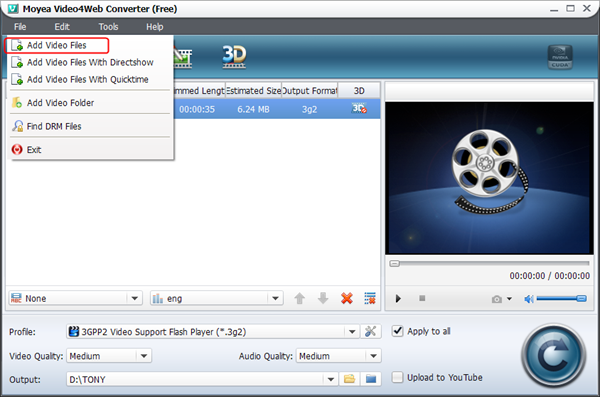
Import 2D video

2. Set the output file as FLV/MP4/MOV/3GP/3G2 video in the drop-down menu of "Profile".
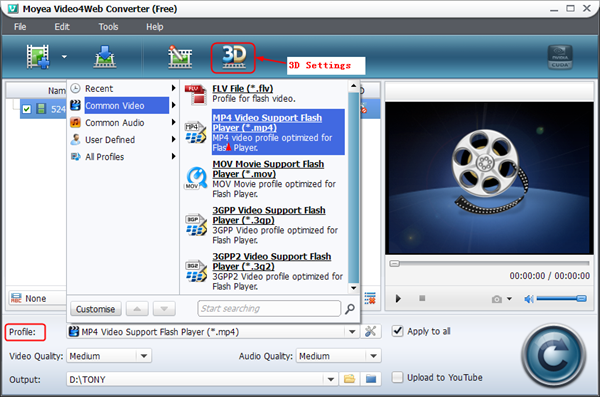
Set the output file

3. Click "3D Settings" icon and then six 3D effects are provided. Choose the one you want and adjust 3D depth with corresponding bar in the interface.
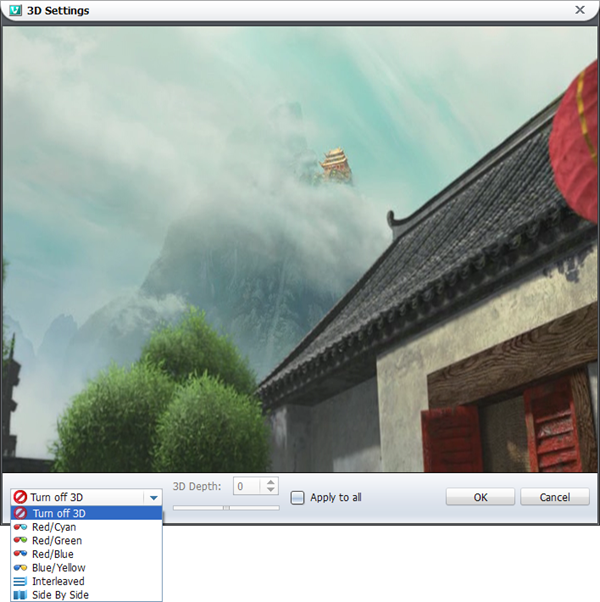
3D Settings

4. Click convert button to start the conversion. When the conversion completes, you can have mange the process of 2D to 3D conversion.

As a free 2D to 3D converter, Moyea Video4Web Converter can only support the output of limited files. If you want more powerful 2D to 3D Converter, you can refer to Video Converter.

II. Free 2D to 3D player

 Nowadays, KM Player can help you to manage 2D to 3D conversion. With just a few clicks, you can watch 3D videos freely and easily. Do the following steps.

1. Download and launch KM Player. Click "KM Player" icon and then choose "Open File(s)…" in the drop-down menu to input the video.

Input video

2. Right click the video and choose "3D screen control" in the drop-down menu. Then various 3D effects have been shown up in the submenu for selection.

Convert to 3D video

3. After that, you can watch 3D videos with KM Player freely.

Those are the two free methods to help you manage 2D to 3D conversion. Either with Moyea Video4Web Converter or with KM Player can you watch 3D movies freely with little or no budget. If you have any other better ideas on this, you are welcomed to share with us.

Tuesday, April 24, 2012

Two Powerful Media Players To Help You Enjoy Movies

With the rapid development of science and technology, film industry has experienced several technological innovations. From silent film to voiced film and then to 3D film, the film industry has gone through major ups and downs.

However, it is still an industry with large potential market. Along with the development of the film industry goes the evolution of relative apps. Thanks to the development of media player, people now can not only watch videos via TV or PC but also tablets and even phones.

In a vast sea of media players, how are you supposed to pick up those that are powerful? In terms of fame, Adobe Flash Player stands out among all. However, Adobe Flash Player is even not perfect when playing swf file. So we can't judge a player by its fame.

Here this post will show you two powerful media players to help you enjoy movies. The standard for my judgment lies in the function of the player. Hence, I want to recommend you two players: KM Player and VLC Player.

1. KM Player

KM Player

KM Player is a powerful tool that can support major popular formats available at present. You get to know that point when you find that KM Player can support swf file and rm file. Usually, we tend to convert swf file with some professional tool like Moyea SWF to Video Converter because not only few players but also fewer video converters can support it.

Besides supporting various video formats, KM Player can also help you to rip audios from videos so you can have more choices besides converting the videos to audio files to get audios of videos. Besides ripping audios, you can also capture videos or frames with KM Player.

In the era of 3D movie, it becomes a fashion to make and watch 3D movie. So a method to help you watch 3D movies will be considered cool. Besides converting video to other file with 3D effects attached via Video Converter, you can also refer to KM Player for help.

A good player should be one that not only powerful in function but also helpful to users. To this extend, KM Player deserves its reputation and fame.

2. VLC Player

VLC Player

VLC Player is not just well-known for its fame, but also for its function. Similar to KM Player, it can support various popular formats. But that's not the point where it is selected. It is its function to support PowerPoint 2007 that attracts my attention.

As we all know, PowerPoint 2007 is quite powerful in function. You can insert videos into the slides with different ways. You can insert some files like wmv or avi files directly or you can insert swf file with the help of Shockwave Flash Object. However, you can hardly insert flv file into PowerPoint 2007 with similar operations.

Before I installed VLC Player, I need to convert flv file to wmv file with Moyea FLV to Video Converter Pro when I want to insert those downloaded YouTube videos into slides. However, with the help of VLC Player, you can easily manage it because VLC Player will provide a tool (similar to Shockwave Flash Object) for PowerPoint 2007 named "VLC ActiveX Plugin and IE Web Plugin" to help you.

All in all, those are the two powerful media players favored by me. If you have other good ideas, you can share with me in the message board below.